
What Are the Top AI Powered Glasses for Buyers?

AI-powered eyewear has moved beyond novelty. Buyers can now compare cameras, speakers, voice assistants, translation tools, battery life, and prescription options. The differences matter at street level: a readable notification in bright sunlight is useful; a camera that drains its battery before lunch is not. That trade-off is real.

Counterpoint Research reported that global smart-glasses shipments rose 210% year over year in the first half of 2025, with Meta holding about 73% of the market. The figures signal rapid growth, not proof that every device is ready for everyday use. At Meta Connect 2024, Mark Zuckerberg described glasses as “the ideal form factor for AI.” His view helps explain the appeal: glasses can provide hands-free access to an assistant while keeping a wearer’s phone in a pocket. Still, comfort, privacy controls, and dependable software deserve equal attention.

This guide compares leading Ai-Powered Glasses by practical features, not launch-day promises. It looks at sound clarity in a noisy café, camera performance outdoors, control simplicity, and how long frames remain comfortable. Small details count. So does a clear return policy. Product claims can change after updates, and independent testing remains uneven; buyers should treat early reviews with care. The best choice may not be the most advanced model. It may be the pair you actually want to wear all day.
What Are the Top AI Powered Glasses for Buyers?

How AI-Powered Glasses Combine Sensors, Audio, and Artificial Intelligence

AI-powered glasses turn everyday frames into a small sensing system. A camera can capture a scene, while microphones pick up speech and an inertial sensor tracks head movement. Together, these inputs give the software useful context. A spoken question about a street sign, for example, may be matched with an image from the wearer’s view. Small details matter. Sensor quality and placement affect what the glasses can interpret.

Audio is often the most immediate part of the experience. Open-ear speakers can deliver directions or a translation while leaving the ears uncovered. Microphones may help reduce background noise, though a busy café can still confuse voice recognition. The AI then processes a request, identifies relevant information, and returns a short spoken reply. Some tasks may run on the device; others can depend on an internet connection. That difference affects speed, availability, and how much personal data leaves the glasses.

For buyers, useful questions include whether the camera is easy to control, whether recording is clearly indicated, and how long the battery lasts during calls and AI features. Try the glasses in ordinary settings, not only a quiet showroom. Check whether audio remains clear outdoors and whether responses feel timely. The technology can be helpful, but it is not mind reading. It may misidentify an object or miss a quiet instruction, so critical details still deserve a second check.

AI-Powered Glasses: Audio Sampling Rates in Context

Microphones provide sound input for voice commands and AI features. These common audio sampling rates offer context—not specifications for any particular glasses.

AI glasses may combine microphones with cameras and motion sensors; AI interprets those inputs to support features such as voice interaction and scene understanding. Actual hardware and capabilities vary by device. Reference context: 8 kHz telephony, 16 kHz commonly used in speech processing, 44.1 kHz CD audio, and 48 kHz digital video audio.

What Types of AI-Powered Glasses Are Available to Buyers?

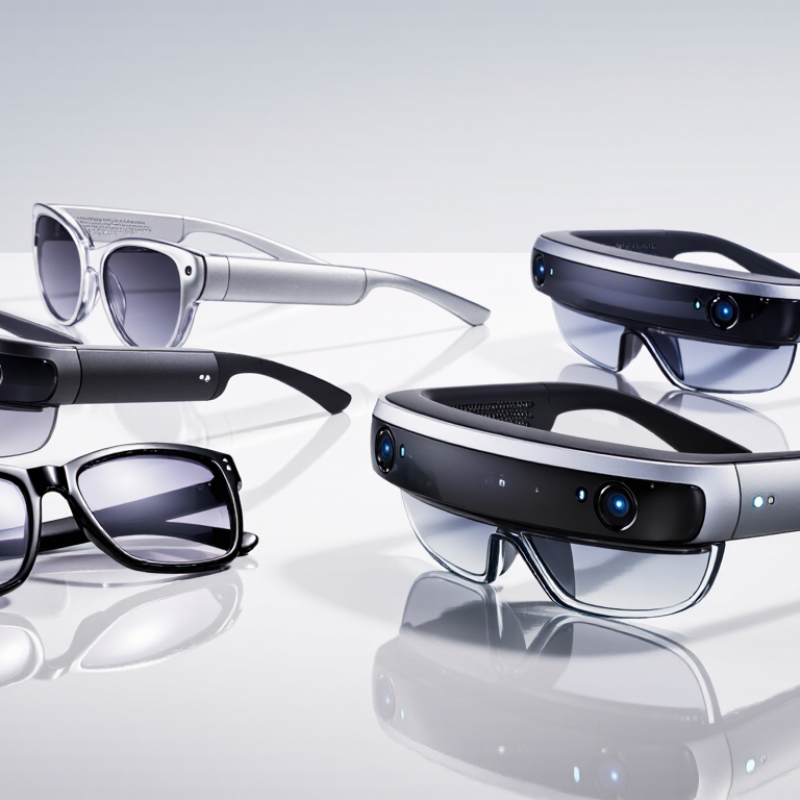
AI-powered glasses generally fall into four types: audio-first, camera-enabled, display-equipped, and prescription-compatible models.

Audio-first glasses use microphones and open-ear speakers for voice queries, calls, and spoken directions. They suit a commute, but crowded streets can make responses hard to hear. Camera-enabled models can capture photos or interpret a scene, such as reading a menu. Their usefulness depends on clear lighting and careful handling of personal data.

Display-equipped glasses place brief information, such as navigation arrows or translated captions, in the wearer’s view. They can be helpful while walking, though small text may feel tiring after an hour. Prescription-compatible designs let buyers use corrective lenses, but frame weight and fit still matter.

Counterpoint Research reported that global smart-glasses shipments grew 210% year over year in the first half of 2024. That figure covers smart glasses broadly, not AI functions alone, so it should not be read as proof of equal demand for every type.

Buyers should compare battery life, microphone performance, display visibility, and prescription options in real settings.

The awkward truth: no single style does everything well.

Which Features Distinguish Leading AI-Powered Glasses?

Leading AI-powered glasses are distinguished by useful features, not the number of functions listed on the box. Grand View Research valued the global smart-glasses market at about $1.93 billion in 2023, but market growth alone does not prove daily usefulness. Buyers should check whether voice controls work in noisy streets, whether microphones capture clear speech, and whether the camera has a visible recording indicator. Small details matter.

Battery life, weight, and fit shape everyday use. A pair that presses against your temples becomes tiring before lunch. Look for comfortable nose pads, adjustable arms, and lenses suited to your vision needs. Also check which tasks happen on the glasses and which require a phone or internet connection. That difference affects speed, privacy, and usefulness when travelling. Not just novelty.

Privacy controls deserve equal attention. Pew Research Center’s 2023 report on Americans’ views of artificial intelligence found that 81% expected people to have little or no control over how companies use AI-generated information. That finding is not a glasses-specific test, but it highlights a real buyer concern. Check for clear recording signals, easy microphone and camera controls, and understandable data settings. Still, specifications can be vague. Compare independent battery and audio tests when available, and treat unverified claims cautiously.

How to Compare AI Glasses for Different Buyer Needs

What Are the Top AI Powered Glasses for Buyers?

Compare AI glasses by the job you need them to do. For calls and navigation, check microphone clarity, speaker volume, and battery life during a full commute. For hands-free notes or translation, test whether voice recognition works in a busy café. Fit matters, too. Heavy frames can feel uncomfortable after an hour, even when the software is impressive.

Grand View Research valued the global smart-glasses market at about $1.93 billion in 2024 and projected 27.3% annual growth from 2025 to 2030. That forecast signals rising interest, not guaranteed product quality. Compare features against your routine, rather than buying based on market momentum. Pew Research Center found that 81% of U.S. adults felt the risks of companies collecting personal data outweighed the benefits, in its 2019 survey. The finding is older, but it makes privacy controls worth checking.

Look for clear recording indicators, simple controls, and settings that let you limit data collection. Check whether essential functions work without a phone nearby, and whether the glasses pair smoothly with your existing devices. Test the details. A short in-store demo may not reveal comfort issues or weak battery performance. I would also treat AI accuracy claims cautiously: accents, wind, and overlapping voices can change results in ways a polished demonstration may not show.

What Are the Top AI Powered Glasses for Buyers? - How to Compare AI Glasses for Different Buyer Needs
Buyer-oriented profile Best suited to Visual output Typical hardware AI and phone requirements Battery expectations Main trade-off to check
Audio-first assistant glasses Hands-free calls, voice queries, navigation prompts, and listening to audio. Usually no built-in visual display; responses are delivered through audio or a connected phone. Open-ear speakers or directional audio, microphones, and wireless phone connectivity; camera inclusion varies. Many AI tasks rely on a companion phone and an internet connection. Available features depend on the software service and region. Often suited to intermittent daily use; frequent calls and audio playback reduce runtime. Check microphone performance in noisy places, audio privacy, and whether the assistant works with your phone.
Camera-and-assistant glasses Capturing first-person photos or video and asking questions about visible surroundings. Generally no in-lens display; camera results and many AI responses appear on a phone or are spoken aloud. Small outward-facing camera, microphones, speakers, and wireless connection; camera resolution and video limits vary by model. Image-based AI may require uploading media to a phone or cloud service. Some functions need an active data connection. Camera recording and AI use can drain the battery faster than occasional audio use; expect runtime to vary substantially by activity. Review recording indicators, consent expectations, storage settings, and restrictions on continuous recording.
Display-enabled everyday glasses Viewing brief prompts, directions, captions, or notifications without looking down at a phone. A small, often monocular display can show limited information; it is not typically equivalent to a full-size screen. Compact display optics, sensors, and wireless connectivity; some designs also include audio and a camera. Phone pairing is common. AI features and displayed content depend on compatible apps, operating-system support, and connectivity. Display use adds power demand; frequent screen activity generally shortens time between charges. Check readability outdoors, prescription-lens options, field of view, and whether notifications are comfortable to view.
Immersive or work-focused AR glasses Guided procedures, remote assistance, spatial overlays, and hands-free workplace information. Can provide richer digital overlays than simple notification displays; capabilities differ widely across designs. May include multiple cameras or sensors, spatial tracking, and a dedicated compute unit or connected processing device. Often requires supported workplace software, device management, and reliable network access; some processing may be handled by a connected device. Continuous display, tracking, and communication can require more frequent charging or an external power source. Assess weight, fit, safety requirements, field of view, software integration, and total system cost before purchase.
Comparison note: These are buyer-oriented device profiles, not guaranteed specifications for every product. Features, battery life, phone compatibility, and AI availability vary by model, software version, region, and usage. Confirm current specifications before buying.

What Privacy, Compatibility, and Cost Factors Should Buyers Consider?

AI-powered glasses can capture voices, images, and location, often with a quick tap or spoken command. Check whether recording is clearly signaled and whether voice clips stay on the device or reach cloud servers. Pew Research Center’s 2019 survey found 79% of U.S. adults were concerned about how companies use their data. That concern is practical, not abstract. Review storage, deletion, and app-permission controls before buying. A bright recording light helps, but it does not explain where files go.

Compatibility can be less obvious than the product page suggests. Confirm support for your phone’s operating system and version, then check which features need a separate app or account. Test call audio, notification controls, and the connection with your usual earbuds. Small details matter. Prescription wearers should verify lens options and replacement costs; a comfortable frame in a shop may feel different after a full workday.

Compare the full ownership cost, not just the shelf price. Include prescription lenses, protective cases, paid cloud storage, and any subscription needed for core features. Ask how long software updates are promised, since smart glasses depend on a working phone connection and updated apps. Pew also found 81% of U.S. adults felt the potential risks of companies collecting data outweighed the benefits. Those figures come from a 2019 survey, so expectations may have shifted. Still, privacy settings are easy to overlook when the demo feels seamless.